When a visual flow builder beats writing orchestration code by hand

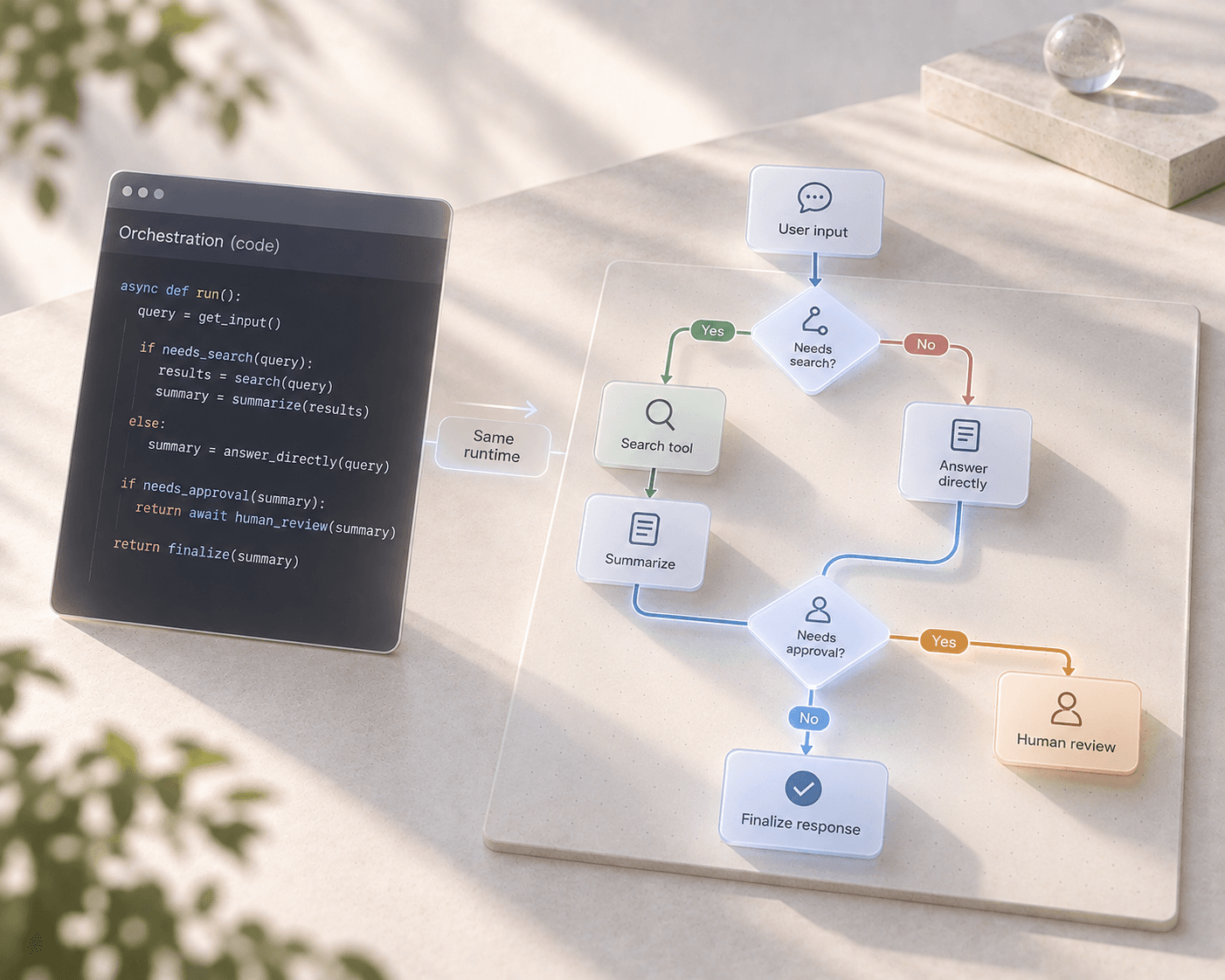
A visual flow builder trades a small amount of raw flexibility for a large gain in legibility — every conditional branch, tool call, and approval step is visible on one canvas instead of buried in code only its original author fully understands six months later. Not every agent workflow needs a hand-written orchestration script, and the cases where a canvas is the faster, more maintainable choice are more common in production than "no-code" skepticism usually assumes.
What gets lost when orchestration lives only in code
Hand-written orchestration gives you full control over every detail, and that control comes with a cost that compounds over time: every branch, retry policy, and tool call is a few more lines buried inside a function, readable only by carefully tracing execution paths through the source. A new team member reviewing "what does this agent actually do when a customer asks for a refund" has to read code to find out. A product manager who wants to sanity-check the logic can't, without asking an engineer to walk them through it. And a small change — adding one more approval step before a high-risk action — means finding the right place in a script to insert it correctly, without breaking a branch three functions away that assumed the old structure.
What a canvas makes visible
A flow is a directed graph of typed nodes: an agent node, a condition node, a tool call, a human-in-the-loop approval step, all laid out and connected on one canvas. That structure alone changes who can participate in reviewing and editing the logic — a non-engineer on the team can look at the graph and understand (and sometimes directly edit) the decision points without reading a line of code, because the branches and their conditions are drawn, not buried in control flow.
Concretely, in UnderOcean's flow builder, this maps onto a specific, fixed catalog of node types —
an agent_node for a fully configured agent with its own memory and guardrails, a condition_node
for a branch evaluated against flow state, an http_node for an outbound call to an external
service, a once_node for logic that should fire only the first time a session hits it — so a
reviewer isn't just looking at boxes and arrows with unclear semantics, they're looking at a small,
well-defined vocabulary of what each shape can actually do.
Not a toy runtime bolted onto a real one
The reason this trade-off doesn't cost as much as it might sound like it does: UnderOcean's flow
builder isn't a simplified, separate runtime sitting next to "the real thing." A flow authored
visually with @xyflow/react on the frontend compiles down to the exact same LangGraph
StateGraph execution engine that backs code-driven agents — the same streaming contract (token,
step, tool_call, observation, done, error over SSE), the same three-layer context management, the
same multi-tenancy and guardrail guarantees. Choosing the canvas over hand-written code is a choice
about how the logic is authored and reviewed, not a downgrade in what the resulting system can
actually do at runtime.
That equivalence is also why moving between the two isn't a one-way door: a condition_node
evaluates the same kind of boolean expression a hand-written if statement would, in a sandboxed
interpreter rather than raw eval(), and a code_node exists specifically for the moments where a
small, self-contained data transformation is genuinely easier to write as a few lines of code than
to represent as a subgraph of primitive nodes.
When code still wins
None of this makes a visual canvas the right choice for everything. A tight, performance-sensitive
data transformation with no branching is usually clearer as a few lines in a code_node than as a
chain of primitive nodes trying to represent the same logic visually. And a genuinely novel
algorithm — something with no natural mapping onto "agent, condition, tool call" — is still often
best expressed as code, wrapped behind a single node the rest of the flow can call, rather than
forced into a shape the canvas isn't built to represent well.
The actual decision rule
The pattern that holds up in practice: reach for the canvas when a workflow's structure — which
branch runs when, which steps require human approval, how agents and tools are wired together — is
the part worth making visible and reviewable by more than one engineer. Reach for code within a
node when a specific step's logic is a self-contained computation that doesn't benefit from being
drawn as a graph. Most production flows end up as a mix of both, which is exactly what the
code_node and condition_node primitives are there to support.
FAQ
Does using the flow builder mean giving up custom logic entirely?
No — code_node runs arbitrary JavaScript in the same sandboxed interpreter used for condition
evaluation, specifically for steps where a small custom computation is the clearest way to express
something.
Is a visually-built flow slower at runtime than hand-written orchestration code?
No — both compile down to the same LangGraph StateGraph execution engine; the canvas changes how
the logic is authored, not the runtime that executes it.
Can a flow call another flow, the way a function calls another function?
Yes — trigger_flow_node nests another flow from the same project as a sub-flow run, with
guarding against a flow triggering itself into infinite recursion.
Who typically edits a flow once it's built — only engineers? Not necessarily — because branches and conditions are visible on the canvas rather than buried in source, non-engineers on a team can often review, and in many cases directly adjust, a flow's logic without needing an engineer to translate it for them first.