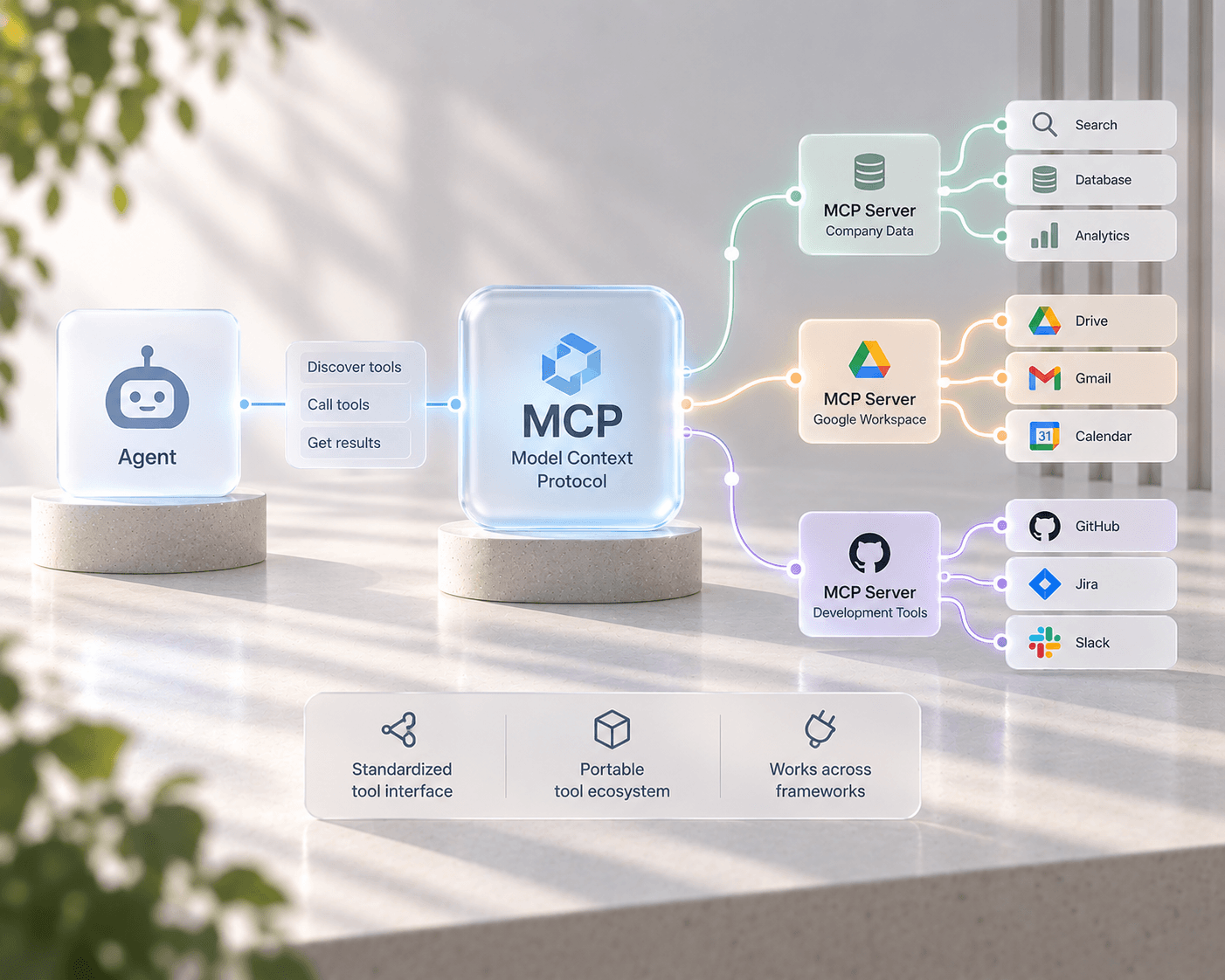
What is MCP, and why every agent framework is adopting it

The Model Context Protocol (MCP) is a standard contract between an AI agent and the tools it calls — typed tool schemas, a common discovery mechanism, and a common invocation format — so a tool built once works with any MCP-compatible agent, instead of being rewritten for every framework. Before MCP, every agent framework invented its own way to describe available tools, call them, and pass results back. A tool wrapper built for one framework's function-calling format rarely worked in another without a rewrite. MCP fixes that by standardizing the contract itself, not just one framework's implementation of it.
The problem MCP solves
Tool use is what turns a language model into an agent: the ability to search a database, call an API, read a file, or trigger a workflow, then reason over the result. But "tool use" was never standardized at the protocol level — every framework shipped its own schema for describing a tool's parameters, its own way of serializing a call, and its own format for returning results. A team building an internal tool (say, a ticket-lookup function) had to write and maintain a separate integration for every agent framework that might call it.
MCP replaces that N×M integration problem with a single contract. An MCP server exposes a set of tools with typed JSON Schema parameters over one of a few standard transports; any MCP-compatible agent can connect, discover what tools are available, and call them — without either side needing to know anything framework-specific about the other.
How an MCP connection actually works
In UnderOcean, an MCPServer is a project-scoped configuration record:
class MCPServer:
    id, project_id
    name
    transport: MCPTransport   # stdio | sse | streamable_http
    command: str | None        # stdio only — a local process to launch
    url: str | None            # sse / streamable_http only — a remote endpoint
    env_vars: dict              # encrypted at rest (often holds API keys/tokens)
    headers: dict | None        # for HTTP-based transports
Three transports cover the practical range of how tools get hosted: stdio for a locally
launched process (a script or binary UnderOcean spawns and talks to over stdin/stdout),
sse for a remote server streaming responses over Server-Sent Events, and
streamable_http for a remote server using MCP's newer streamable HTTP transport. Whichever
transport is configured, the calling side — an agent or a flow — sees the same tool interface.
Two services back every connection: a client.py that handles the handshake, tool listing, and
invocation for one server, and a client_manager.py that pools and manages connections across
every MCP server configured in a project. Both the agent tool loader and the flow engine's
dedicated MCP node share this same manager — there's exactly one code path that talks to MCP
servers, not one per feature.
Two ways to use an MCP tool
MCP tools show up in two different places in UnderOcean, for two different needs:
- Agents —
agent/tools/builds LangChain-compatible tool wrappers directly from the live tool list the client manager fetches from each connected server. During its ReAct reasoning loop, an agent decides whether to call an MCP tool and what arguments to pass, the same way it would decide to call any other tool. - Flows —
mcp_tool_nodecalls one named tool directly and deterministically, mapping flow state keys onto the tool's parameters via an explicitarg_mapping. Use this when a flow needs a specific tool call every time, not an agent deciding among several options.
That split matters: agentic tool selection is the right model when you want an LLM reasoning about which tool to use and why; a fixed node is the right model when a step in a flow should always call the same tool the same way, with no ambiguity and no extra model call.
Discovery and testing without leaving the UI
Because the tool list comes live from the running server rather than a cached schema, GET /mcp/{id}/tools always reflects whatever tools that server currently exposes — if a team adds a
new tool to their internal MCP server, UnderOcean agents can call it the next time they run,
with no redeploy on the UnderOcean side. POST /mcp/{id}/test gives you a connectivity check
before wiring a server into a live agent or flow, and the same CRUD and tool-listing surface is
exposed identically through the Consumer API for external, API-key-authenticated clients — no
duplicated logic between the two.
Secrets stay encrypted
MCP server configs frequently carry credentials of their own — an API token the server needs to
reach a downstream service, for instance — stored in env_vars. Those are encrypted at rest
through the same envelope-encryption path used for LLM provider API keys, so adding an MCP
integration doesn't mean introducing a new place for secrets to leak.
FAQ
Is MCP specific to UnderOcean? No — MCP is an open, framework-agnostic protocol. UnderOcean is one of many agent platforms that implement it; a well-built MCP server should work with any compliant client, not just UnderOcean's.
Do I need to write custom code to connect an MCP server? No. Adding an MCP server is a configuration step (transport, command or URL, credentials) in the UnderOcean UI or API — no per-integration code, and no framework-specific tool wrapper to maintain.
What's the difference between an MCP tool and a regular flow tool node?
A regular tool_node declares a tool for an upstream Agent/LLM node to call, implemented inside
UnderOcean. An mcp_tool_node calls a tool hosted on an external MCP server instead — the
underlying tool-calling mechanics an agent sees are otherwise the same.
Can one project connect to multiple MCP servers at once?
Yes — client_manager.py pools connections across every MCP server configured for a project, and
an agent's tool list is the union of everything currently reachable.